August 6, 2026
Best clipboard managers for Mac: history you can browse and reuse
Choose a Mac clipboard manager for everyday use: a design that fits macOS, history you can scan and reuse, and local privacy — not only a sync checklist.
Search for a Mac clipboard manager and you will find long comparison tables: free vs paid, sync vs no sync, launcher vs dedicated app. Those lists are useful — but they often skip the reason people install one in the first place.
You copy all day. You need to open history again, recognize the right item, and reuse it without breaking your flow. The best clipboard manager for Mac is the one that makes that loop feel natural on macOS.
This guide focuses on that basic job: browsing and reusing clipboard history with a design that fits the Mac. Local-first privacy is a strong bonus. Cross-device sync is optional, not the main scorecard.
What “usable” clipboard history means
A clipboard manager fails quietly when history exists but you avoid opening it. Usable history usually means:
- You can open it quickly from the menu bar or a shortcut
- Recent items are easy to scan, not a wall of identical text lines
- Text, links, files, and images are recognizable at a glance
- Search and filters help when “a few minutes ago” is not enough
- Everyday reuse feels lighter than digging through Finder, browser tabs, or chat scrolls
Built-in Spotlight clipboard history covers short-term recovery well. A dedicated manager earns a place when history becomes part of how you work — not only how you undo the last overwrite.
Criteria that matter more than feature count
When you compare Mac clipboard apps, weigh the fundamentals first.
Design that fits macOS
Clipboard tools sit beside system UI all day. A dense, foreign panel fights the rest of the Mac. A compact menu-bar flow, clear list or grid, and previews that feel native keep history something you actually open.
History you can browse, not only recover
Recovery answers “what did I just overwrite?” Browsing answers “where is that screenshot / link / paragraph from earlier?” Type views, image previews, file details, and source-app filters turn a dump of copies into something scannable.
Reuse without extra ceremony
The win is small and frequent: copy again from history, paste where you are, keep moving. Bookmarks help for items you will need longer than a normal history pass. The app should stay out of the way between those moments.
Privacy that matches the content
Clipboard history often holds drafts, private links, and one-time secrets. A local-first design — history on your Mac, no account required for basic use, no vendor sync of clipboard content by default — keeps that archive closer to where you copied it. Sensitive-type skipping and app exclusions tighten the habit further.
How common Mac options compare
No single app wins every checklist. These are the shapes most people actually choose.
| Approach | Strength | Trade-off |
|---|---|---|
| Spotlight clipboard | Built in, fast for very recent items | Short-term recovery, limited everyday browsing |
| Lightweight history apps (e.g. Maccy) | Fast, keyboard-first, minimal | Often thinner on visual/file browsing |
| Polished sync-first apps (e.g. Paste) | Strong presentation, cross-device continuity | Sync and subscription become part of the product |
| Launchers (Alfred, Raycast) | Great if you already live in the launcher | Clipboard is one feature among many |
| Plainboard | Menu-bar history for text, links, files, and images, with local-first defaults | Mac-only; not built around cloud clipboard sync |
If you already depend on Alfred or Raycast, their clipboard features may be enough. If you want a dedicated shelf for clipboard history that fits the menu bar and stays local, a focused manager is usually clearer.
What Plainboard optimizes for
Plainboard is a local-first clipboard manager for macOS. The product bet is simple: make clipboard history pleasant to reopen on the Mac where you work.
- Open history from the menu bar in a compact or expanded view
- Browse text, links, files, and images with type-aware layouts and previews
- Filter by content type or source app when you remember where you copied from
- Bookmark items you want to keep within reach longer
- Skip concealed or transient clipboard types, and exclude apps you do not want monitored
- Keep history on your Mac — no Plainboard account, and clipboard content is not uploaded to Plainboard servers for sync
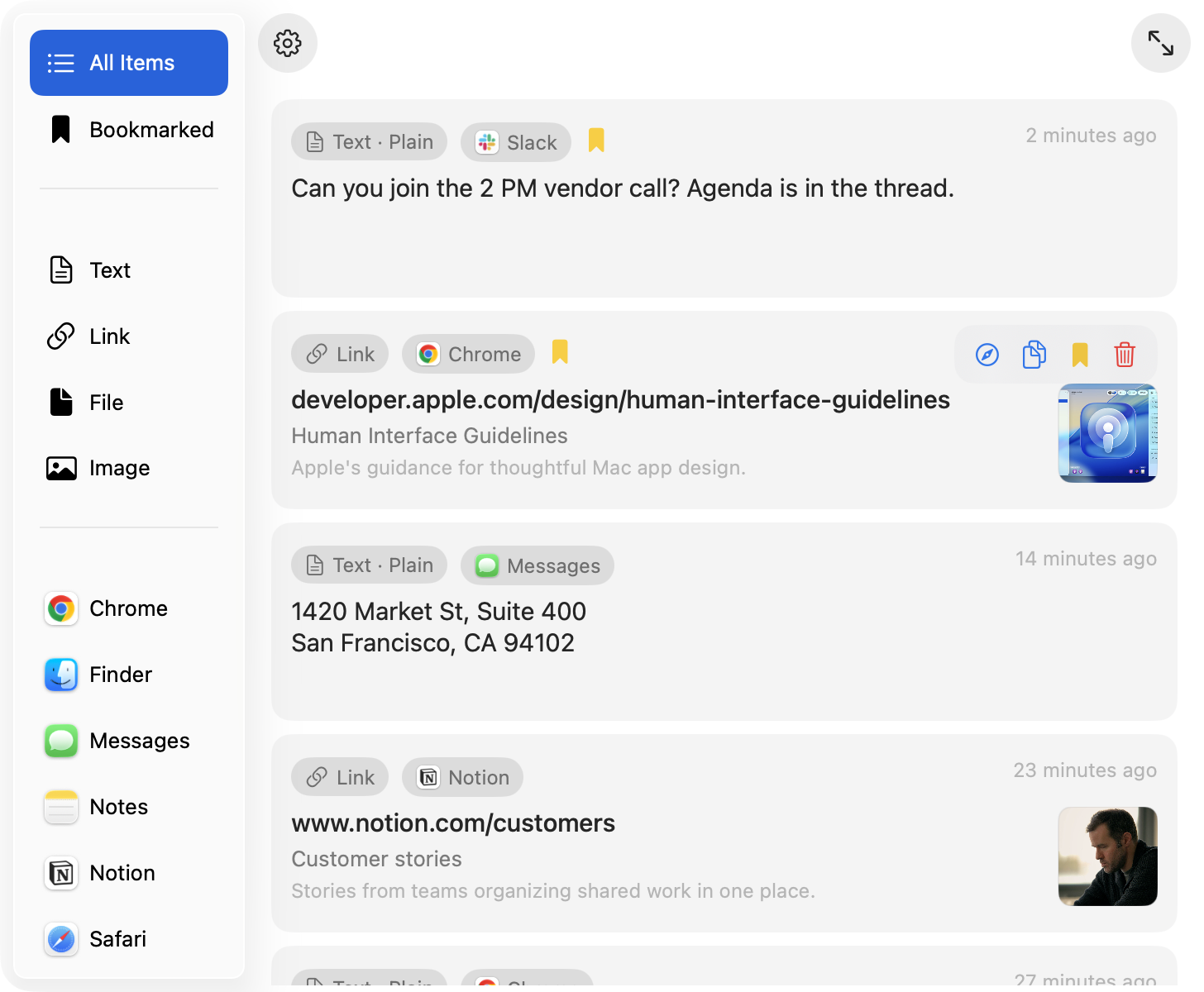
That is the everyday loop: copy while you work, open history when you need something again, recognize it quickly, reuse it, and leave the rest on the device.
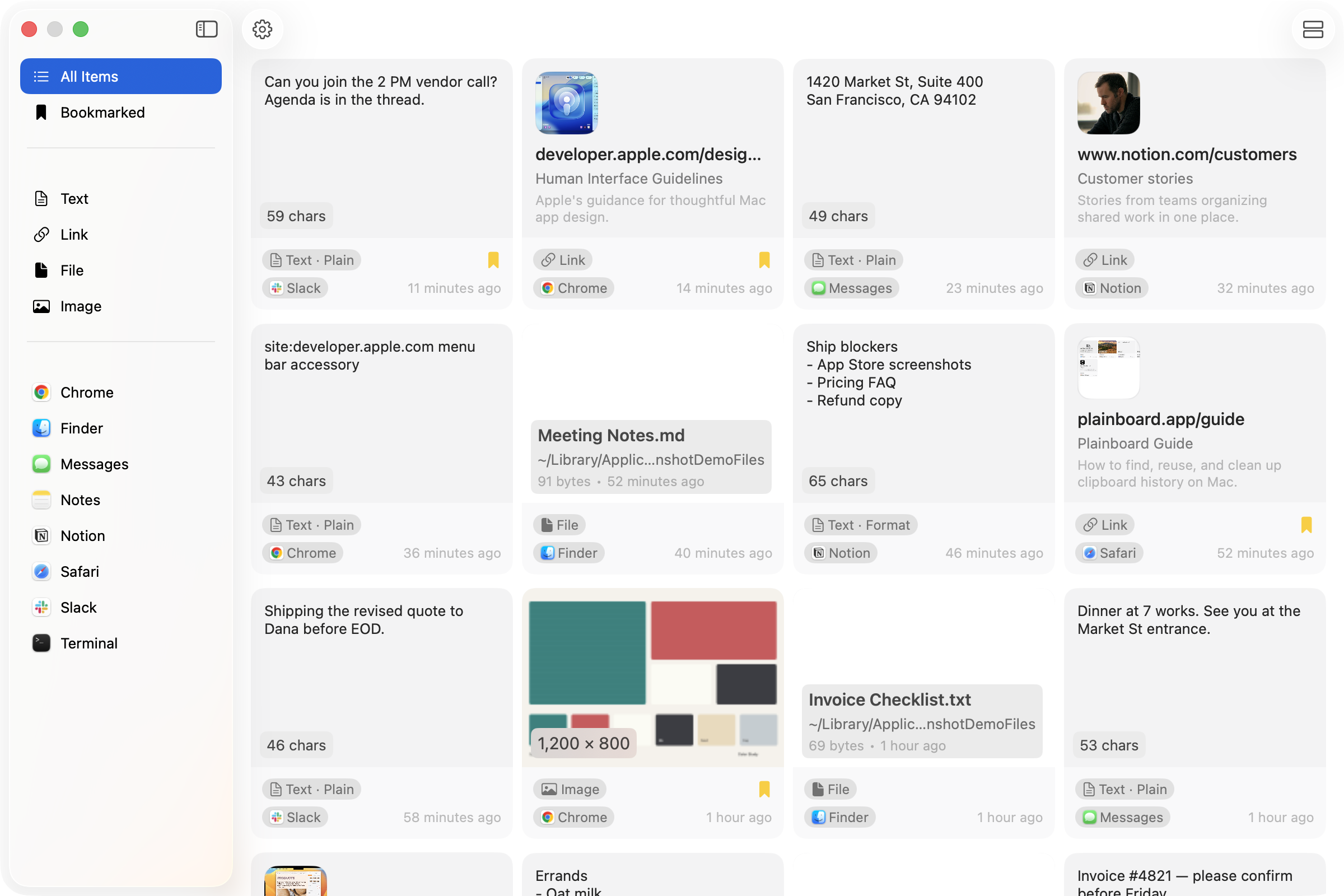
For files and images specifically, type-based browsing matters as much as recency.
When a dedicated Mac clipboard manager is worth it
A dedicated manager fits well if you:
- Overwrite useful copies several times a day
- Reuse screenshots, files, and links — not only short text
- Want history that feels like part of macOS, not a separate workspace
- Prefer local history with clear privacy controls
- Do not need clipboard sync across phones and tablets as the main feature
If you only recover the last item every few days, Spotlight may be enough. When history becomes a temporary shelf you open on purpose, the design and browsing basics matter more than a longer feature list.
Frequently asked questions
What is the best clipboard manager for Mac?
It depends on your workflow. For short-term recovery, start with Spotlight. For everyday browsing of text, links, files, and images with a local-first menu-bar app, Plainboard is built for that job. If you already use Alfred or Raycast heavily, try their clipboard features first.
Do I need cloud sync?
Only if you regularly need the same clipboard history on another device. Many Mac workflows stay on one machine. In that case, browsable local history usually matters more than sync.
Is a free clipboard manager enough?
Often yes for basic text history. Pay attention to how you browse images and files, how privacy controls work, and whether the interface is something you will open daily — not only whether the price is zero.
How is Plainboard different from Spotlight clipboard history?
Spotlight is strong for recent recovery. Plainboard is built for repeated reuse: type views, previews, source-app filters, bookmarks, and monitoring controls, with history kept locally on your Mac.
Will a clipboard manager slow down my Mac?
A well-behaved menu-bar manager should stay light in the background. Prefer tools that respect sensitive clipboard types and let you exclude apps, so history stays useful without capturing everything.
Next step
If you want Mac clipboard history you will actually open again — with a design that fits the menu bar and stays on your Mac — try Plainboard. Browse what you copied, reuse it when you need it, and keep the archive local.
Related posts
How to view clipboard history on Mac (Spotlight Command-4)
View clipboard history on Mac: Command-Space, then Command-4. On macOS 26.1, Results from Clipboard is 30 minutes, 8 hours, or 7 days — 7 days is a max, not a dedicated manager. Plainboard keeps longer local history with type/app filters, files, images, and bookmarks — no account.
Local clipboard manager on Mac: on-device, no cloud sync
A local clipboard manager on Mac keeps history on-device: no account, no cloud sync. Plainboard stores text, links, files, and images locally instead of uploading clipboard content.
Try local clipboard history with Plainboard
Use Plainboard to find the link from Chrome, the file from Finder, or the note you copied earlier.